Creating an unfaulted grid
On the Unfaulted Grid form, you create an unfaulted grid for your existing ConnectFlow fracture model. To do this, you assign a source 3D grid and the resulting unfaulted target grid is generated without the faults from the input 3D grid. Note that the assigned 3D grid must have an associated structural model. The structural deformities due to the faults, in the source 3D grid, are modified into a continuous 3D grid as shown in the image below.
To create an unfaulted grid
- On the form, select a fracture Model from the drop-down list.
- If you have an Existing unfaulted grid, check the adjacent checkbox. In such case, the drop down options in the source grid label shows the existing unfaulted grids in your solution. If you select an existing unfaulted grid, the Map Properties step in the workflow is skipped since the grid properties have already been mapped on the selected unfaulted grid.
- Select a Source 3D grid available in the solution from the adjacent drop-down list.
- Assign a New target grid name in the adjacent field for the unfaulted grid that you want to create. By default, a target grid name '<source grid name> (Unfaulted) <#>' is generated after you select the source grid.
- Click Apply to create the unfaulted grid and keep the form open, or click OK to create the unfaulted grid and proceed to the Map Properties form.
The newly generated target unfaulted 3D grid is stored in the JewelExplorer under the 3D Grids folder.
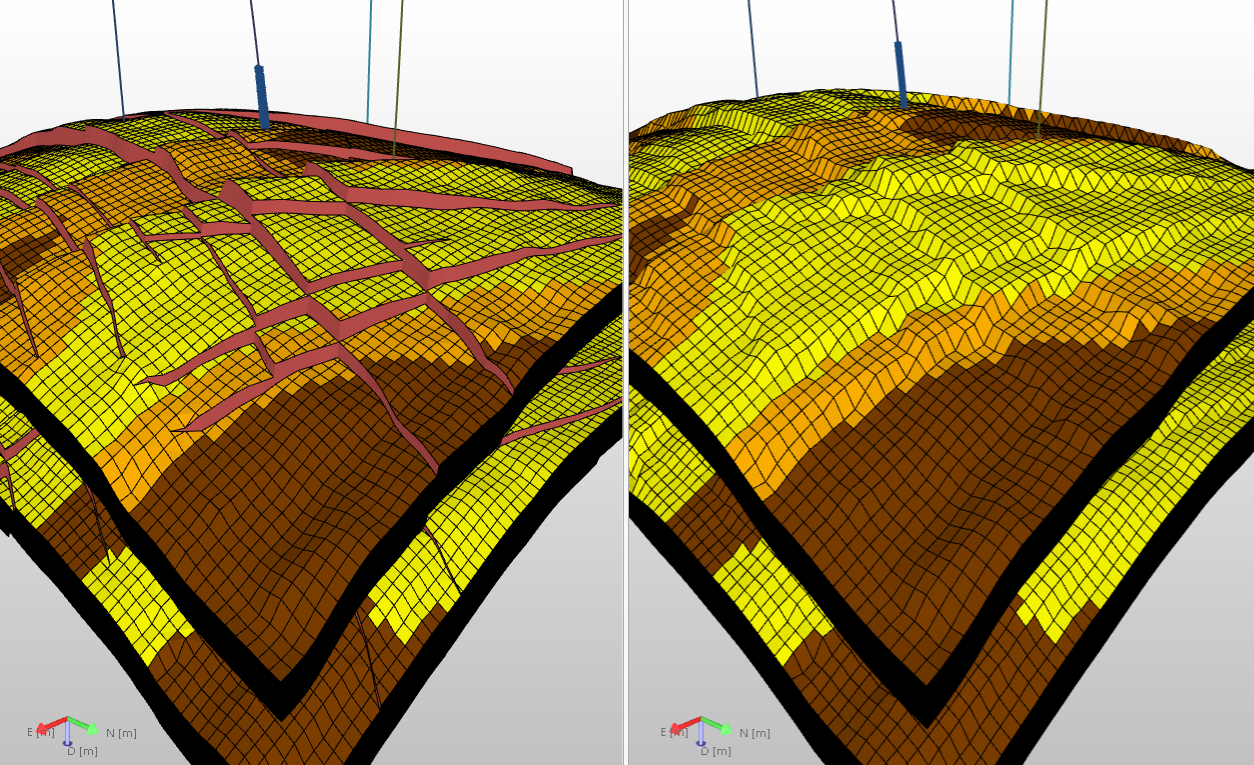
Creating an unfaulted 3D grid (right) from a structural 3D grid in the solution (left). click to enlarge